
1. Land use
1.1. Basic data
The land use mapping most often used in the model is a composite mapping between the Registre Parcellaire Graphique 2019 (for « crop » land use classes) and the IGN BD TOPO (« other crop » land use classes).
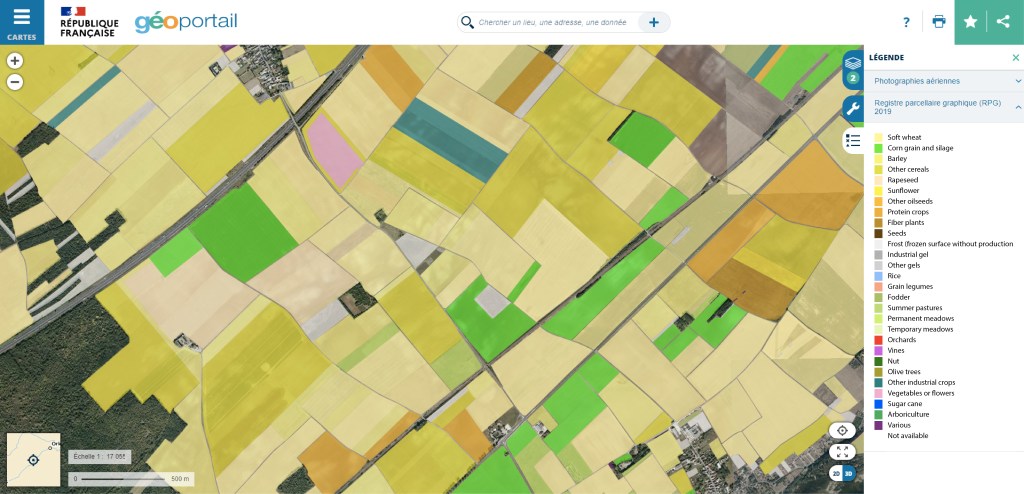
The Graphic Land Register
The « Registre Parcellaire Graphique » (RPG) is a geographic database used as a reference for Common Agricultural Policy (CAP) subsidies. The anonymous version used in this study contains the 1/5,000th resolution of the crop islets, as well as the type of main crop grown according to a 328-class nomenclature, with details of crop seasonality (winter, spring). The RPG can be viewed on geoportail.fr using a 28-class nomenclature, and can be downloaded free of charge from the IGN website.
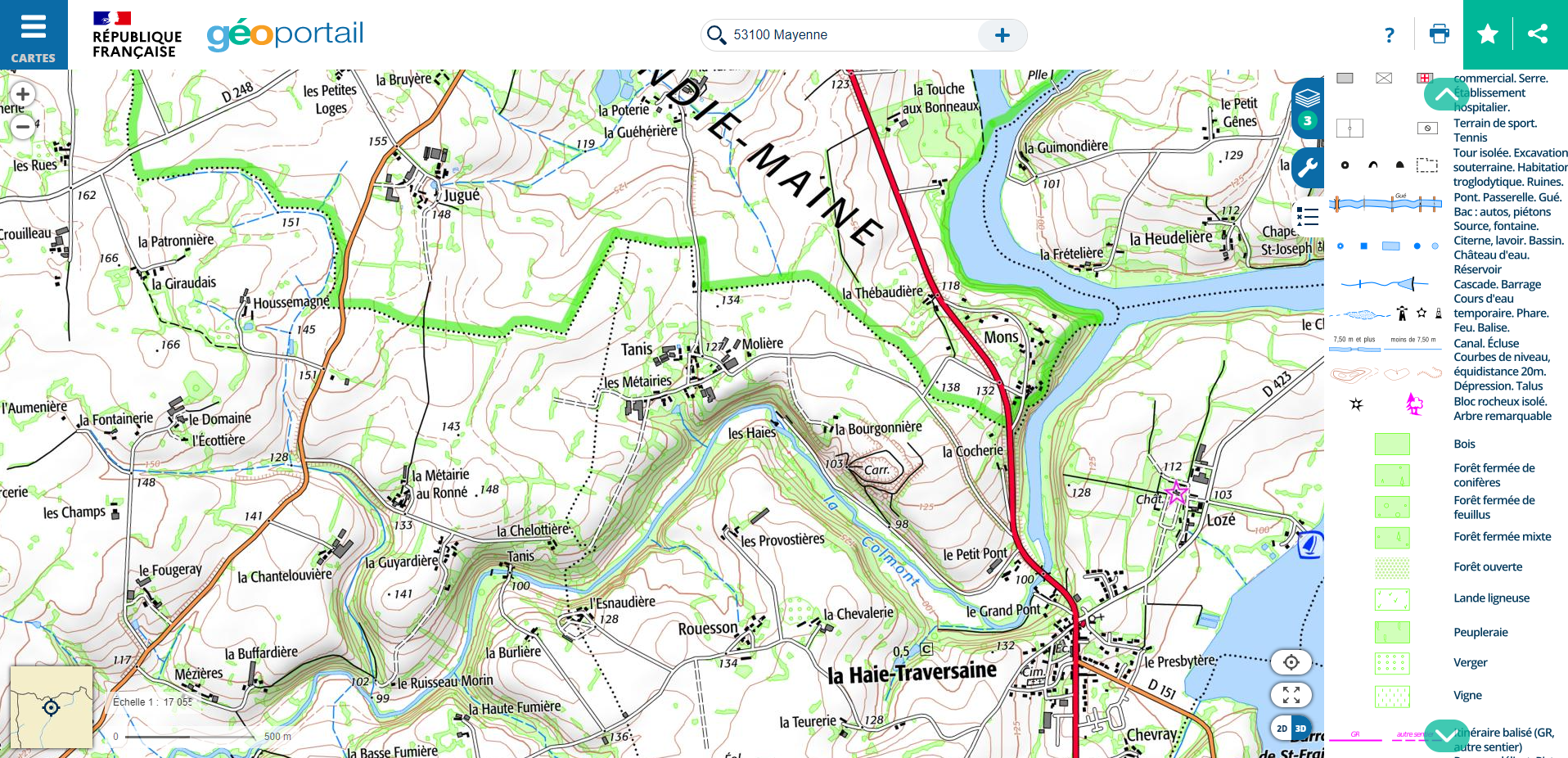
The BD TOPO
IGN’s BD TOPO is a description of landscape features in the form of vectors of metric precision, classified according to an appropriate theme (« Road network », « Hydrography », « Buildings », etc.). These elements can be found on IGN maps, as illustrated below. BD TOPO can be downloaded free of charge from the IGN website.
1.2. Database simplification and merging
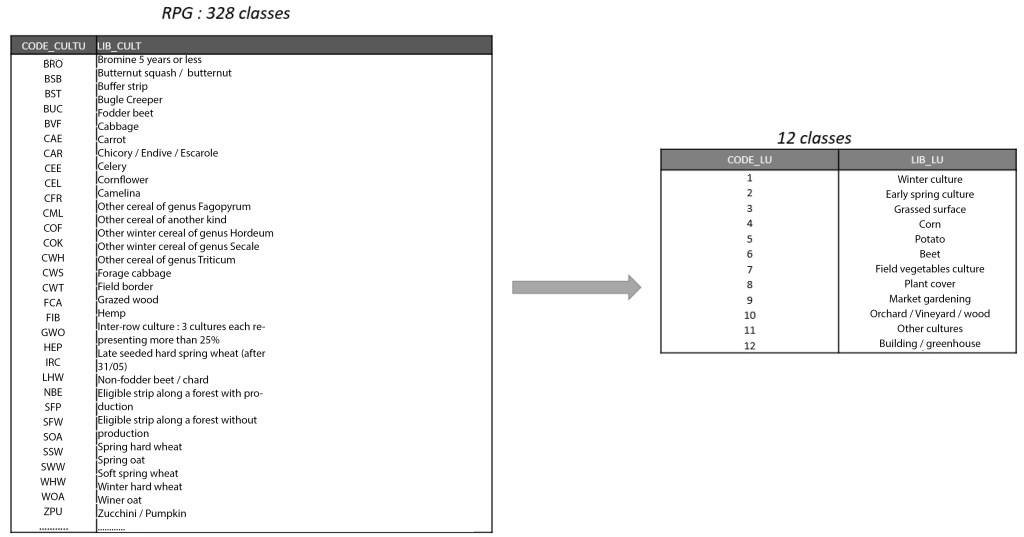
With 328 classes in the RPG, it is very difficult to define the hydrodynamic and erosive properties of each class. Groupings are generally made on the basis of crop sowing and harvesting dates, and their sensitivity to runoff and erosion. For example, the 328 classes can be grouped into 12 classes with a code ranging from 1 to 12.
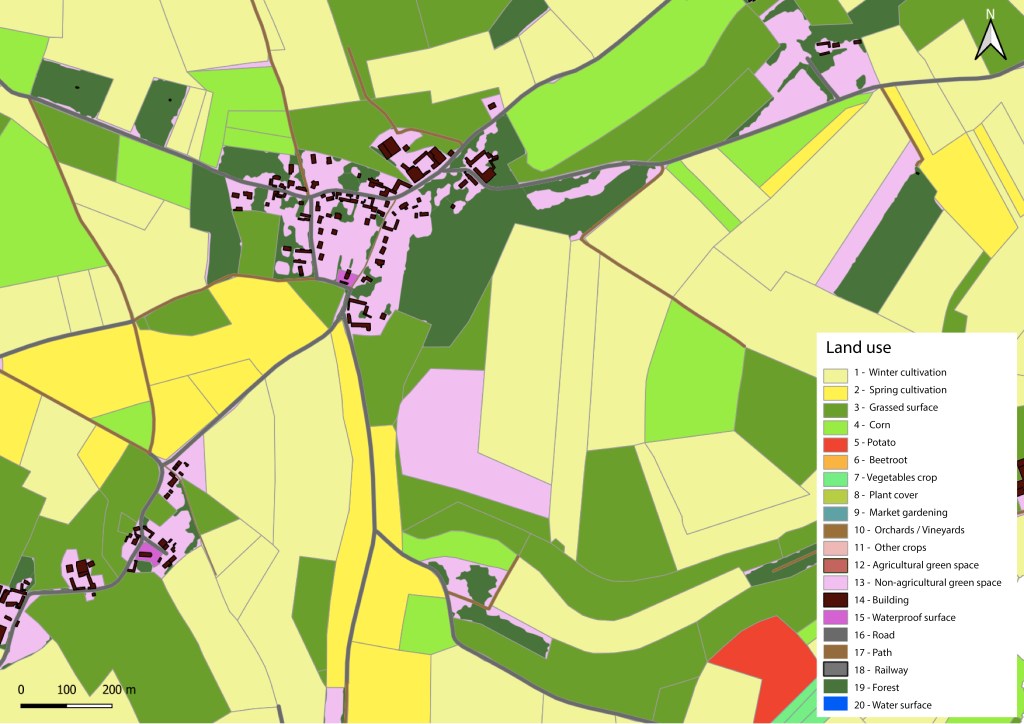
The various themes of the BD TOPO complete the mapping of land use with, for example, 8 additional classes with a code ranging from 13 to 20.

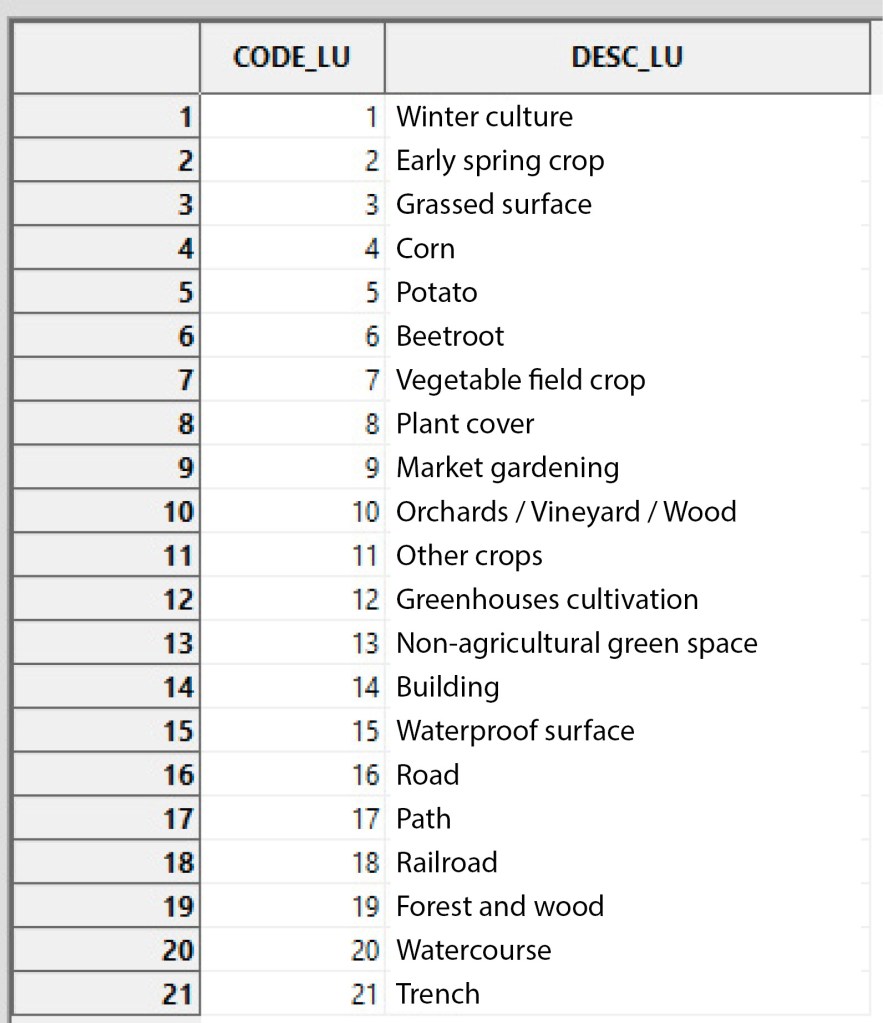
After this simplification and merging step, the final land use mapping of the dataset has, in this example, 20 classes, each characterized by a unique code ranging from 1 to 20.
Note: Other land cover maps (Corine Land Cover, Theia, etc. ) can be used, depending on data availability and modeling objectives. Other nomenclatures can be used, and there is no limit on the number of classes. The only condition is to have a nomenclature with a specific CODE_LU for each class.
1.3. Application to case study
Note: Nomenclature simplification work is to be carried out beforehand by the user using GIS tools (QGis, ArcGis).
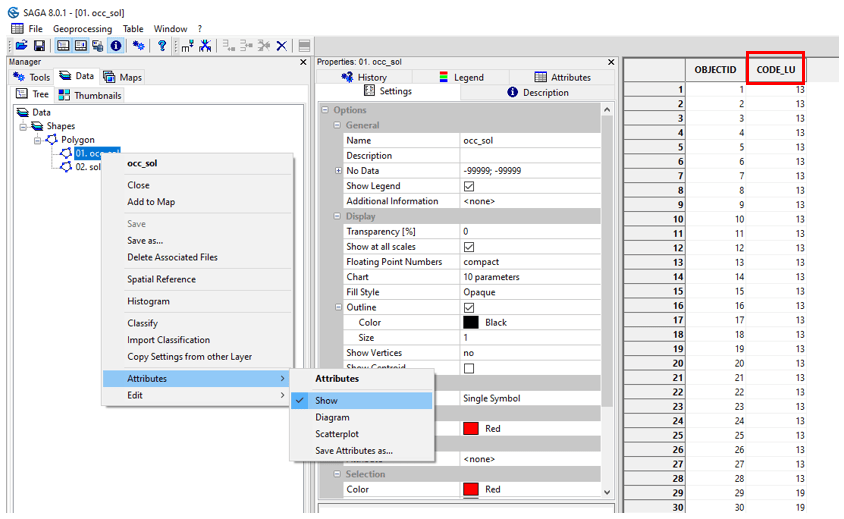
Launch SAGA GIS. Open button and point toward the occ_sol.shp file.
/TUTORIEL/PREPROCESSING/OCC_SOL/occ_sol.shpClick on Open bottom right of the window.

The shapefile appears in the Data tab and is automatically classified in Data, Shapes, Polygon.
To view the attribute table for the occ_sol.shp layer, right-click on the layer on Attributes then Show. The attribute table contains a CODE_LU field with a code ranging from 1 to 19 (not all codes are shown).
The land use class associated with each code is visible in the nomenclature_occsol.txt file. Import the .txt file using the Open button.
/TUTORIEL/PREPROCESSING/REGLES/nomenclature_occsol.txtThe table appears in the Data tab and is automatically filed in Data, Tables. Right-click on the table, then Show.
2. Runoff axes
2.1. Basic data
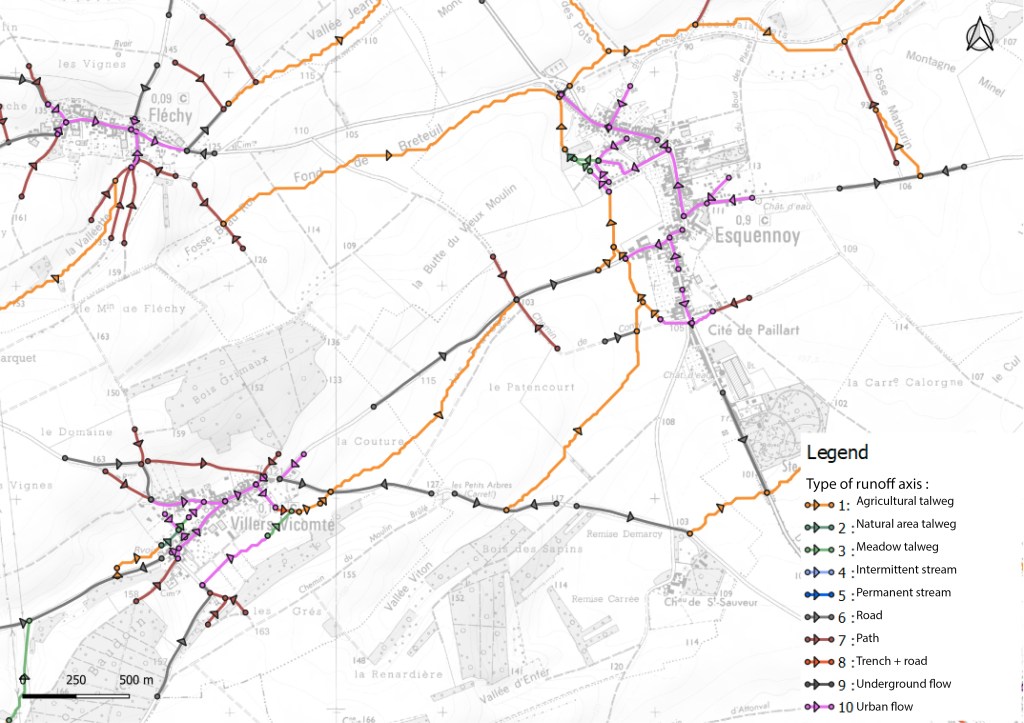
Runoff axes have specific properties that need to be integrated to describe the watershed. The mapping of runoff axes and their typology is not available in national databases. This mapping is obtained by field expertise. The raw runoff axes obtained from the DTM are checked/completed and each axis is classified according to a typology defined by the user.
2.2. Application to case study
Open button and open the axe_ruissellement_modif.shp file.
/TUTORIEL/PREPROCESSING/TOPOGRAPHIE/axe_ruissellement_modif.shpThe shapefile appears in the Data tab and is automatically classified in Data, Shapes, Line. View the attribute table by right-click on the layer, on Attributes, then Show.

As with land use, a CODE_LU is assigned to each type of runoff axis. In our example, 3 types of axis are considered with a specific CODE_LU :
- Path : 17
- Watercourse : 20
- Trench : 21
Notes :
It is possible to have a common CODE_LU for both land use mapping and axis mapping. For example, if the runoff axis is located on a road, it is assigned a CODE_LU with a value of 17.
You can add as many types of runoff axis as you like, as long as each type has a specific CODE_LU. For example, if we wish to add a « Nozzle » type runoff axis, all we need to do is create a specific CODE_LU that is not redundant with those already defined (for example, a CODE_LU of 22).
3. Soil
3.1. Application to case study
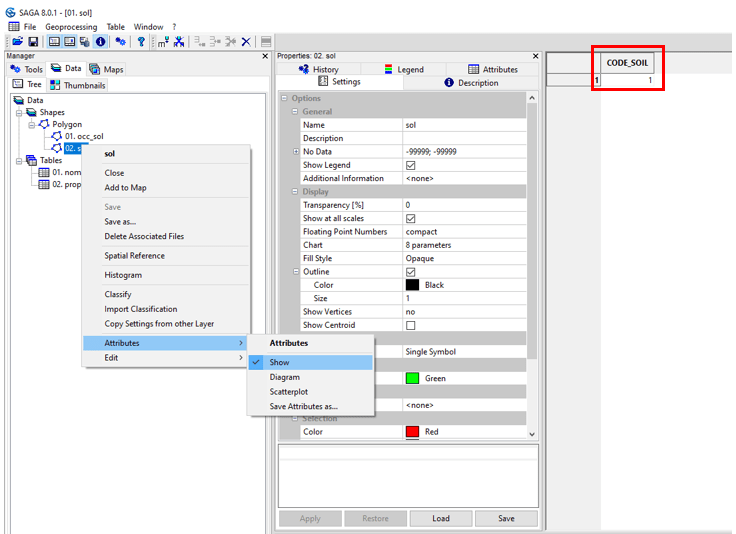
Open button and open to ouvrer the sol.shp file.
/TUTORIEL/PREPROCESSING/OCC_SOL/sol.shpTo view the attribute table for the soil.shp layer, right-click on the layer on Attributes then Show. On the study site, only one soil type is considered (loamy-textured soil) with an CODE_SOIL of 1.

 WaterSed